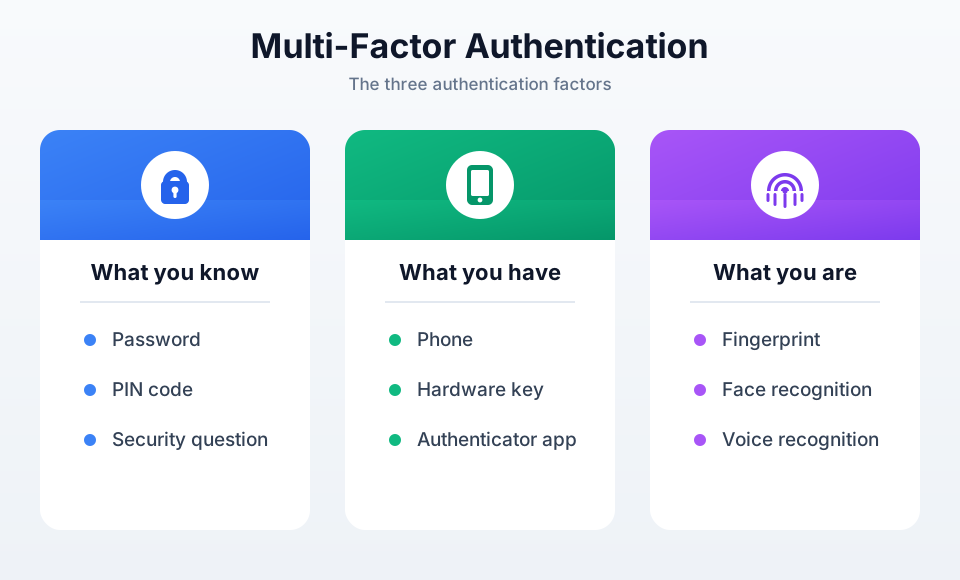
We talk about multi-factor authentication (MFA) when authentication requires at least two factors from different categories.
Why Do We Need Multi-Factor Authentication?
Attackers have many techniques available today for bypassing authentication systems that rely solely on a username and password.
Password Reuse
Since people do not like remembering many different passwords, it is common for the same password to be reused across multiple websites. If just one of those services suffers a data breach, attackers can use the leaked credentials to attempt logins on other websites. This technique is commonly known as credential stuffing.
You can check whether your email address has appeared in known data breaches on https://haveibeenpwned.com/.
Weak Passwords
Common and easy-to-guess passwords can be targeted automatically. Even with proper rate limiting, attackers may eventually gain access if weak passwords are used. With poor rate limiting—or enough persistence—even short but uncommon passwords can be brute-forced.
Security expert Reza Zaheri recommends using passwords that are at least 16 characters long. However, length alone is not enough. Passwords such as aaaaaaaaaaaaaaaa or passwordpassword are still weak despite being 16 characters long. A long password with sufficient randomness and complexity provides significantly better protection.
You can experiment with password strength and estimated cracking times at https://www.security.org/how-secure-is-my-password/.
Social Engineering
Even the strongest password becomes useless if an attacker convinces you to enter it on a fake website. These attacks may arrive through email (phishing), SMS (smishing), or phone calls (vishing). They can also involve malicious documents, macros, or deceptive search engine results.
The goal is always the same: trick you into revealing sensitive information. Most traditional two-factor authentication methods (such as SMS or OTP codes) provide limited protection against these real-time phishing attacks.
Authentication Methods and Their Effectiveness
Password Only
We have already discussed passwords. In this case there is only one factor: something you know.
Relying solely on passwords should generally be limited to applications where security is not particularly important, such as demo applications.
Password + SMS
This is one of the weakest forms of multi-factor authentication, although it is still widely used, including by some high-security services.
The second factor is possession of the phone that receives the SMS message. Unfortunately, SMS-based authentication suffers from weaknesses such as legacy SS7 vulnerabilities and SIM swap attacks.
While SMS significantly improves security compared to using only a password, stronger alternatives should be preferred whenever possible.
Password + Email Verification Code
From a security perspective, this approach belongs in a similar category to SMS-based authentication.
When you receive a verification code by email, it effectively acts as a second authentication step. The problem is that the code is delivered to the same email account that is typically used for password recovery. If an attacker gains access to that email account, they often have everything required to take over the target account.
For this reason, many security professionals consider email-based verification weaker than authenticator apps or passkey-based authentication. Nevertheless, it is still a significant improvement over password-only authentication and is relatively simple and inexpensive to implement.
For applications that do not handle particularly sensitive information, it can be a reasonable compromise.
Password + Authenticator App
This is what most people think of when they hear “two-factor authentication.”
Authenticator applications such as Authy, Google Authenticator, and Microsoft Authenticator generate a new code every 30 seconds using a secret that was shared during setup. Both the server and the authenticator application possess the same shared secret.
Using the current time and that shared secret, both sides independently generate the same six-digit code. This mechanism is called TOTP (Time-Based One-Time Password), allowing the server to verify the user’s code without transmitting the secret itself.
TOTP can significantly increase the difficulty of an attack because stealing the password alone is no longer sufficient. However, it is not resistant to phishing. Attackers can still request the TOTP code on a fake website and immediately relay it to the legitimate service while logging in on the victim’s behalf.
Hardware Security Keys
Hardware security keys are physical devices required to complete authentication. Examples include YubiKey, SoloKey, and Titan Security Key.
Many security professionals still consider them one of the strongest authentication methods available. However, their cost can make them impractical for many consumer applications.
The next category belongs to the same ecosystem while being far more accessible to everyday users.
Passkeys + Local User Verification
This is currently considered the industry gold standard.
Passkeys are resistant to phishing attacks because they rely on public-key cryptography rather than shared secrets. Each passkey consists of a private key and a public key. The public key is stored by the application’s backend, while the private key remains securely stored on the user’s device.
During authentication, the server sends a randomly generated challenge to the client. The device signs that challenge using the private key, and the server verifies the signature using the corresponding public key.
An attacker cannot obtain the private key without compromising either the device itself or the secure credential manager that stores it. Possessing the device alone is usually not enough because the private key can only be used after local user verification, such as biometric authentication or a PIN.
You may notice similarities to SSH public-key authentication. The underlying idea is indeed similar. However, passkeys are bound to specific domains, resistant to phishing, and designed to work seamlessly in modern applications without requiring users to interact with a terminal.
Tips for Implementing 2FA (JS/TS Environment)
If you look at older tutorials, you will almost certainly encounter the Speakeasy package. However, it is no longer actively maintained, making the otpauth package a more attractive option due to its continued development and growing adoption.
This package can be used to generate and validate TOTP codes on your backend.
For applications that are used frequently but do not store highly sensitive data, it may be worth offering a “remember this device” option. This improves the user experience by only requiring the second authentication step when logging in from a new device or after a certain amount of time has passed.
Such a bypass token can be stored in an HttpOnly cookie.
It is also good practice to ensure that a TOTP code can only be used once, even if it remains valid within the authenticator application’s time window.
Recovery Codes
Whenever two-factor authentication is introduced, a secure account recovery process should also be provided.
The most common approach is to generate one-time recovery codes that users can store offline and use if they lose access to their authentication device.
Tips for Implementing Passkeys (Node Environment)
A popular choice for Node.js backends is the WebAuthn standard. Many developers use the @simplewebauthn/server package, which handles the challenge-response workflow used during both registration and authentication.
Users should be allowed to register multiple passkeys for the same account. Although passkeys are often created on a specific device, many platforms automatically synchronize them across a user’s ecosystem through services such as iCloud Keychain or Google Password Manager.
In addition, users may want separate passkeys for personal and work devices.
You should also provide an account recovery mechanism for situations where users lose access to all registered devices or passkeys. Recovery codes, alternative authentication methods, or customer support verification processes are common approaches.
Conclusion
Protect Against
| Method | Brute Force | Credential Leaks | Phishing |
|---|---|---|---|
| Password | ⚠️ | ❌ | ❌ |
| SMS | ✅ | ✅ | ❌ |
| Email OTP | ✅ | ✅ | ❌ |
| TOTP | ✅ | ✅ | ❌ |
| Passkey / WebAuthn | ✅ | ✅ | ✅ |
We are entering an exciting era in which passwords may eventually become far less important than they are today. Passkeys have generated significant enthusiasm within the security community, but adoption is still progressing gradually.
One challenge is properly informing users, since people tend not to engage with what they don’t understand. Another problem is that if the private key is lost, account recovery is far from straightforward. If we’re not as large a company as, say, Apple — which knows enough about its users to make that work — the more realistic solution is probably to offer the passkey only as an optional login method, while still keeping password-based or provider-based (e.g. Google) login available for registration. So the security risks tied to these trade-offs still need ongoing attention.
Understanding the strengths and weaknesses of different authentication methods helps us make better security decisions, whether we are building applications or simply using them. Authentication is evolving rapidly, and there is always more to learn.