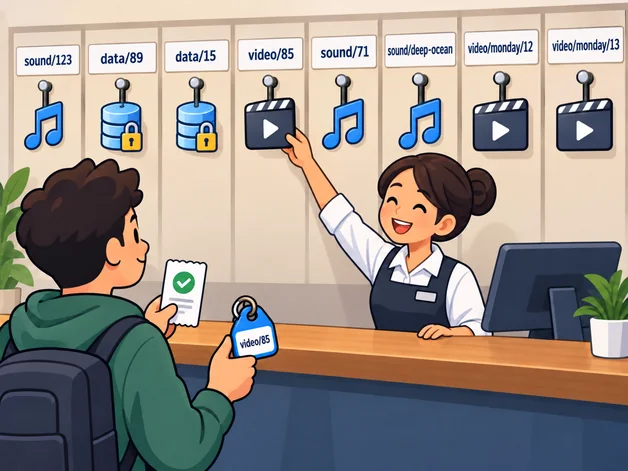
If we want to make sure that we can restore our database after a possible server failure, we need to store copies somewhere independent. We have to create new backups regularly and transfer them there. We also need to manage how long we keep each copy. An S3-compatible object storage service can be a good solution for all these tasks.
What is an object storage?
Object storage is a storage solution where we store data as objects and access them through an API. Objects contain data and its associated metadata. Each object is identified by a unique key within a bucket.
When we store a file in such a service, we assign an identifier to it. These identifiers often resemble paths, such as “audio/hu/monday/123.mp3”, but they do not refer to an actual folder structure. The “/” character simply helps those of us who are used to traditional file systems organize our data more easily. The object namespace itself is not hierarchical. Of course, we can still retrieve groups of objects based on their key prefixes.
Unlike traditional file systems, object storage is primarily designed around storing and retrieving whole objects. When modifying an object, we typically upload its entire contents again rather than directly rewriting a few bytes in the middle.
What are the advantages of object storage?
Independence
We can store our data on infrastructure that is independent of our server, so a physical failure of our VPS does not necessarily result in data loss. However, this alone does not protect us if an attacker gains access to the credentials our backend uses for object storage. We can use separate API keys with limited permissions for backups, but removing delete permissions does not necessarily protect against overwriting or hiding objects.
Durability
Independence alone would not be enough if we simply moved our media files to another server. Downloads might no longer interfere with our backend, but a failure of that single server could still be enough to cause data loss. On top of that, we would have increased complexity.
Object storage providers have developed cloud systems that store data redundantly. They can achieve this, for example, by keeping multiple complete copies or using a mathematical method that makes it possible to reconstruct missing pieces of data. This allows the system to survive a certain number of physical machine failures without losing data.
Durability does not replace backups: redundantly stored data can still be deleted or overwritten. Our PostgreSQL backups also do not automatically include media files stored in object storage.
For backups, it is therefore worth using versioning, retention rules and, if the provider supports it, Object Lock. We should also test restoring our backups from time to time.
Easy scalability
With object storage, growing storage requirements and traffic do not typically require a proportional increase in maintenance effort. The provider manages storage capacity expansion and a significant part of the infrastructure, so we do not need to deploy additional servers every time our capacity requirements grow.
Often good value for money
If we store everything on our own server, we may eventually need a machine with more capacity as our content grows (media files, for example). Our backend traffic might not justify the upgrade, but serving media could already require a more expensive server. By moving media to object storage instead, we can often handle large amounts of data more cost-effectively. There are some pitfalls worth paying attention to, though. We will look at them in the next section.
What are the disadvantages of object storage?
Working with a distributed system
We face distributed-system problems when we connect an external service to our application. Even when storing files in a persistent directory on our own server, we can lose the convenience of atomic operations. With an external service, we definitely need to pay attention to handling potential failures, making retries safe and cleaning up orphaned files.
For example, we might successfully upload an image to object storage, but fail to save its metadata in PostgreSQL. We would then have an object in storage that nothing references anymore. Rolling back a PostgreSQL transaction does not undo operations that have already succeeded in object storage.
Direct access and rate limiting
Along with the convenience we gain from scaling, we also hand over some control to the provider. For example, if our server applies a strict rate limit, it will no longer apply to image downloads unless we route all traffic through our own server. But doing that increases the traffic and load on our VPS. We always need to evaluate which considerations — security, availability or speed — matter most. They may even differ between types of content within the same application.
Cost control
Using object storage can often be cheaper than renting an additional server, but pricing depends on several factors. Besides storage and API operations, many providers charge separately for outgoing data transfer. This is commonly called an egress fee. For example, every time a user downloads an audio file from object storage, the amount of outgoing data being billed may increase.
With a high volume of downloads, egress fees can significantly increase the total cost.
Another problem is that not every provider allows us to set a real spending cap. In many cases, we can only request a warning when our budget is reached, while billing continues. This is one of the important risks of cloud services.
What providers are available?
When we think of object storage, an AWS S3 bucket is probably one of the first things that comes to mind. Amazon’s S3 API has become so widespread that many other providers offer a partially or largely compatible interface. However, compatibility varies, so it is worth checking the required features before switching providers.
Other well-known object storage providers include Google Cloud, Microsoft Azure, Alibaba Cloud, Cloudflare, Backblaze, Wasabi, DigitalOcean, Hetzner and IBM Cloud. Not all of them offer a native S3 API.
It is worth doing a little research to find out which one best suits the needs of our application.
A small application can often integrate object storage for free or at a low cost.
Integration
We can use the same SDK with many S3-compatible providers, although we may need to change the endpoint, region, credentials and sometimes other settings. For NestJS, examples of relevant packages are “@aws-sdk/client-s3” and the related “@aws-sdk/s3-request-presigner”. The latter allows our backend to generate a signed URL (presigned URL) for a particular media object.
Object storage supports both private and publicly accessible objects. With private content, knowing the key alone is not enough to download it. Our backend checks whether the user is allowed to access the content and can then generate a time-limited, signed URL. Anyone who obtains that URL can also access the content while the permission remains valid. Object storage checks the signature, expiration time and permissions of the underlying credentials, but it does not know anything about our application’s user permissions. Authentication through a CDN is also possible, but it significantly increases complexity.
An example of backend usage:
import { GetObjectCommand } from '@aws-sdk/client-s3';
import { getSignedUrl } from '@aws-sdk/s3-request-presigner';

// One method of a service class. The types are application-specific.

  private async signUrl(
    media: ImageBucket,
    key: string,
    windowStart: number,
  ): Promise<SignedUrl> {
    const url = await getSignedUrl(
      media.client,
      new GetObjectCommand({ Bucket: media.bucket, Key: key }),
      {
        expiresIn: media.validitySeconds,
        signingDate: new Date(windowStart * 1000),
      },
    );
    return {
      url,
      expiresAt: new Date((windowStart + media.validitySeconds) * 1000),
    };
  }
Here, signingDate sets the start of a shared time window. If we do not need such windows, we can omit it; if the window has already expired, the generated URL will be expired too.
Conclusions
Overall, I think object storage is worth considering, especially if we want to separate the operation of our application from the physical storage of its data.
When choosing a provider, however, comparing storage prices alone is not enough. The cost of outgoing data transfer, access permissions, backup protection and the ability to limit costs can be just as important.
Ultimately, the right choice depends on the needs of our application and the risks we are willing to take.