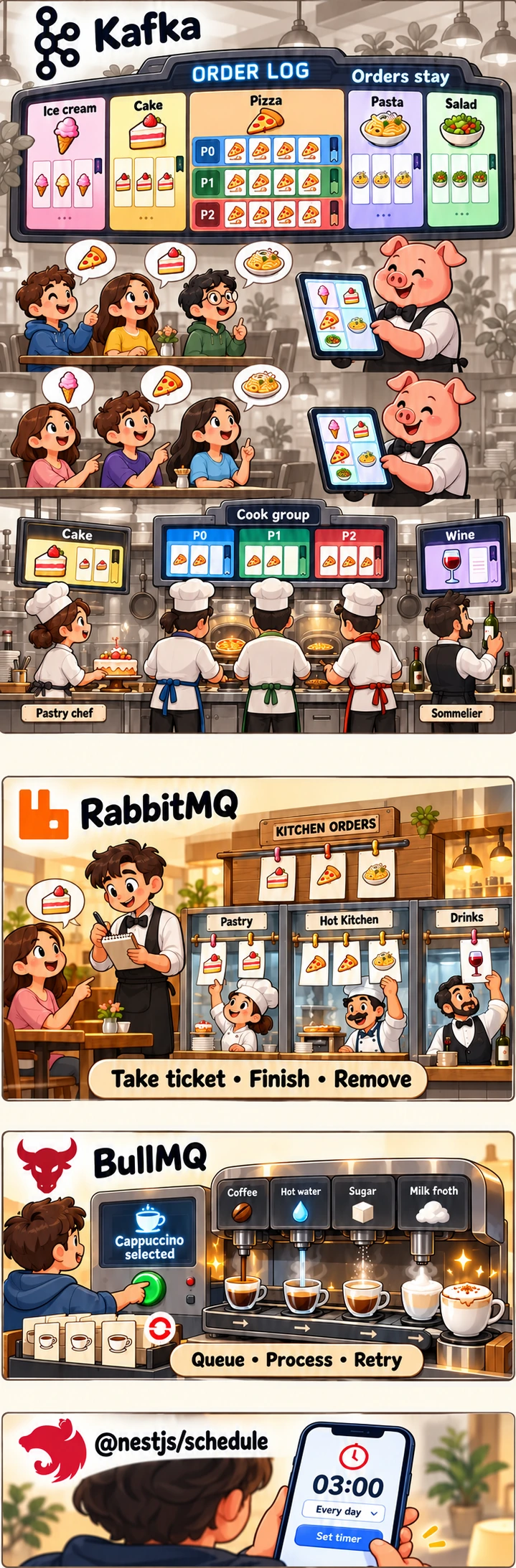
Scheduled tasks
Almost any project intended for the general public reaches a point where it needs scheduled tasks.
- If we want to keep our data safe, we probably won’t set a timer for ourselves to copy the database to an independent server every evening.
- If we don’t want to store every piece of data forever, unnecessarily increasing our infrastructure costs, we run scheduled cleanups.
- If we also need data from external sources, we need to refresh it from time to time.
- If we want to send a notification at a particular time, we need to schedule the message.
I could go on. The point is that scheduled tasks are a useful and almost unavoidable category. Usually, the framework we work with has a package that lets us create them. In NestJS (my usual example), this is @nestjs/schedule.
It is simple to use. We add ScheduleModule.forRoot() to either AppModule or a dedicated Scheduler module that AppModule can then import. After that, we define methods in our services that carry out a task at the times specified by a cron expression. For example:
  @Cron(CronExpression.EVERY_DAY_AT_1AM)
  async handle(): Promise<void> {
    const deleted = await this.metrics.instrumentJob(
      'in-app-notification-cleanup',
      () => this.inAppNotificationService.sweepExpired(),
      { items: (n) => n },
    );

    if (deleted > 0) {
      this.logger.log(`Purged ${deleted} expired notification(s).`);
    }
  }
The scheduler’s logic is simple. When the NestJS application starts, it calculates the next execution time from the cron expression and sets a timer. When that timer becomes due, the event loop executes its callback as soon as it gets the opportunity. This means the timing is not perfectly precise if the Node.js process is busy. Timekeeping relies on the operating system, and the Node.js program can rest when there is no work ready to run.
As the example shows, we collect data about the task. This lets us monitor when it becomes problematic: when it starts using so many resources that we can no longer afford to run it in the same process that responds to incoming requests.
Together or independently?
This brings us to our next participant, BullMQ. This is still a Node.js library we can bring into our project, and we can still run it in the same process as everything else. That is perfectly fine for simpler projects. If a deferred task takes 10–20 ms each night, when there is no meaningful activity, it isn’t worth adding complexity just for that.
BullMQ also allows us to run a separate worker.js, so a separate process with its own event loop can take care of asynchronous tasks we don’t want burdening the main thread.
Of course, we can start a separate process without BullMQ too; BullMQ handles storing, distributing, and tracking the queued tasks.
BullMQ works by keeping track of queues in either Redis or PostgreSQL (which is also true when the worker runs in the same process as the API). Clients add jobs to these queues.
// producer.ts

import { Queue } from 'bullmq';

const coffeeQueue = new Queue('coffee-orders', {
  connection: {
    host: '127.0.0.1',
    port: 6379,
  },
});

async function main() {
  try {
    const job = await coffeeQueue.add(
      'prepare-coffee',                  // Job name
      { drink: 'cappuccino', sugar: 2 },   // Job data
      {
        attempts: 3,
        backoff: {
          type: 'fixed',
          delay: 2000,
        },
      },
    );

    console.log(`Order ${job.id} added to the queue.`);
  } finally {
    await coffeeQueue.close();
  }
}

main().catch(console.error);
Optionally, we can specify how many times to attempt the task and how long to wait between attempts.
The workers can then pick these tasks up from the queue.
// worker.ts

import { Worker } from 'bullmq';
import { setTimeout as wait } from 'node:timers/promises';

type CoffeeOrder = {
  drink: string;
  sugar: number;
};

const worker = new Worker<CoffeeOrder>(
  'coffee-orders', // Must match the producer's queue name

  async (job) => {
    const { drink, sugar } = job.data;

    console.log(`Starting order ${job.id}: ${drink}`);

    // Simulate asynchronous machine operations.
    console.log('Adding coffee...');
    await wait(1000);

    console.log('Adding water...');
    await wait(1000);

    console.log(`Adding ${sugar} teaspoons of sugar...`);
    await wait(500);

    return { drink, ready: true };
  },

  {
    connection: {
      host: '127.0.0.1',
      port: 6379,
    },
    concurrency: 1,
  },
);

worker.on('completed', (job, result) => {
  console.log(`Order ${job.id} completed:`, result);
});

worker.on('failed', (job, error) => {
  console.error(`Order ${job?.id} failed:`, error.message);
});

worker.on('error', (error) => {
  console.error('Worker error:', error);
});

// Finish active work before closing when you press Ctrl+C.
process.on('SIGINT', async () => {
  await worker.close();
});
concurrency: 1 means that this worker runs one task at a time.
For sending notifications, for example, BullMQ can be perfectly sufficient. We can respond to a user’s action straight away without waiting for the email to actually be sent; we just queue the work. It gets processed when its turn comes.
When the project gets big enough to need microservices
We may reach a point where traffic is substantial and a particular group of features puts a disproportionate load on our existing infrastructure. It can then make sense to move these into separate services, separate containers, or separate servers. But this brings up a major question in distributed systems: how do we handle asynchronous communication between microservices?
RabbitMQ is one possible solution. It is a standalone message broker, running in its own environment, with its own mechanisms for storing and distributing messages.
Producers publish messages to an exchange inside the RabbitMQ broker. Based on its configured rules, the exchange routes them to one or more queues, from which consumers receive the messages. With manual acknowledgements, a consumer signals the broker after completing the task, and the message can be removed from that queue.
If processing succeeds but the acknowledgement does not arrive, the same task may be executed again. This is why idempotency matters: running the function multiple times should have the same effect as running it once.
Handling messages this way can allow other services to keep working when one component is temporarily unavailable, because they do not have to wait for a synchronous response from that component.
When we want to process events again later
We might reach a point where our user base is in the millions and a sudden rush could bring in several million requests in a second. Think of a Black Friday sale starting on a large online marketplace. If our system isn’t prepared for peaks like this, it can give up at exactly the worst moment, leaving quite a few disappointed people behind.
Our heavyweight participant, Kafka, may be worth considering here, particularly if we also want to retain events and process them again later. Its distributed architecture allows it to handle enormous throughput. Multiple nodes can act as message brokers, while others manage metadata. (Since the introduction of KRaft, a node can have both roles.)
With Kafka, we can define topics that consumers or consumer groups subscribe to. Topics consist of one or more partitions. In a standard consumer group, partitions allow the members to work in parallel: a partition is read by one consumer in the group at a time, but a consumer can be assigned multiple partitions.
Another major difference from RabbitMQ’s traditional queues is that processed events do not automatically disappear from the log. Their retention is determined by the configured storage and cleanup policies. This means they can remain available to read again for a long time. One blogger even described restoring a damaged database from Kafka logs.
Of course, this doesn’t mean it replaces databases!
Besides communication between services, Kafka can also handle real-time streams, such as real-time location tracking.
Of course, even if we can already picture our millions of users, we can still sit back and drink our coffee. There is no need to jump into implementing Kafka if, for now, our mum is the only person using the app besides us, we aren’t dealing with real-time data streams, and our requests per second are usually still below one. Or below 200…
Using Kafka can significantly increase complexity, not to mention the extra infrastructure costs. It can make sense for a popular product with a whole team behind it, ideally including a dedicated DevOps engineer. But popularity alone isn’t the deciding factor: the requirements can justify Kafka in a smaller system too.
Closing thoughts
I spent quite a while wondering whether I should dare to write about this topic, since I can’t exactly claim decades of experience maintaining huge systems. I probably can’t tell most senior backend developers anything new (or most bots, let’s be realistic about my “readership” 😁).
In the end, I decided to go ahead because I found it useful to look at which tools might suit which tasks. Next time I have a scheduled task, I can ask how much capacity it needs and when it might be worth moving it into a separate process.