What is SQL?
SQL (Structured Query Language) allows us to give a selected database declarative instructions that are relatively close to human concepts about what data we need. Since different database systems implement and extend the SQL standard in different ways, multiple SQL dialects exist. They differ in the keywords and features they use, although there is significant overlap between the fundamental commands. From here on, I will primarily use PostgreSQL for examples.
Does it make sense to learn SQL in the age of AI?
Good question. Unless the cost of using AI increases several times over, perhaps it will never again be efficient to write queries by hand. Unless you’re a Yoda-level backend developer, AI probably knows more keywords and solutions than you do, and it definitely types faster.
As for me, I spent many years primarily working on the frontend, and even in recent years I mostly wrote queries with the help of ORMs, essentially in “light mode”. So when I switched to intensive AI usage with high-level AI agents, I started encountering raw SQL solutions during code reviews that looked elegant and were capable of solving multiple problems in a single step, but I felt I didn’t have enough knowledge to spot when they were slightly wrong. In those situations, I usually ran a few more code reviews on them, but the uncomfortable feeling in my stomach remained.
We probably cannot build knowledge comparable to AI in every area, but I still have this desire to learn as much as possible and keep as much control in my own hands as I can.
Of course, the best way to learn is to invest the time and effort to solve problems ourselves. The question is whether there is time for that. In the software industry, rapid prototyping has a serious advantage, because it doesn’t matter if you have the most elegant query if the competition has already tested their users through three iterations in the same amount of time.
So no, I don’t write queries by hand. However, I had a small PostgreSQL quiz made that uses multiple-choice questions, so instead of doomscrolling, I occasionally do a round while waiting for some “flibberigibbetting” to finish. You can find it here if you’re interested too:
SQL quiz - with level selection
I’m hoping it will help reduce the stomach cramps. We’ll see. In the first round, it might have increased them. 😀
Basic concepts
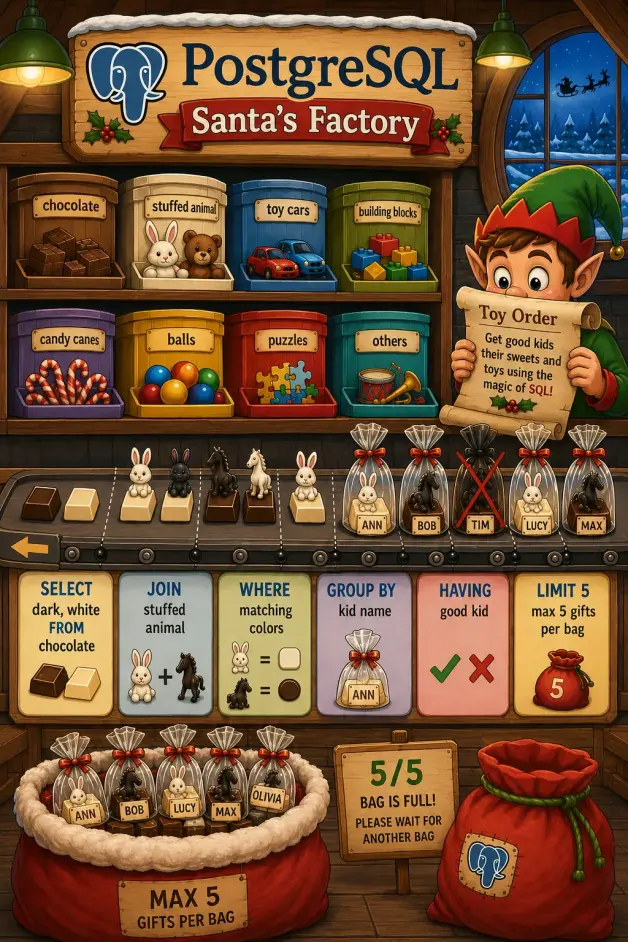
With a better understanding of SQL, our goal is to design queries that are not unnecessarily resource-intensive. For this, it is useful to understand the nature of the fundamental commands: which ones can increase the number of returned rows and which ones can reduce it.
SELECT column1, column2
Avoid the star. Whenever possible, explicitly specify which columns you need. Otherwise, for example, a later table expansion (adding a text, JSONB, or blob column) can unexpectedly make a query significantly slower even if it had been performing perfectly well for a long time. It’s also generally a good strategy to only send what is actually needed, keeping both traffic and the handling of sensitive data under control.
FROM table1, table2
When working with multiple tables, we generally use explicit JOIN syntax today because it makes the relationship conditions in a query easier to read.
INNER JOIN, LEFT JOIN, RIGHT JOIN
These are very often multiplying operations. We combine rows from two tables into new rows. For example, when combining a users table with an orders table, a user may appear in multiple rows because of a one-to-many relationship: once for every order associated with them. In the ON condition, we define under what condition rows from two tables are considered related, for example user.id = order.user_id. WHERE can also be used for filtering, but there is an important difference between the two when working with outer joins: ON determines matches during the JOIN, while WHERE filters the result of the JOIN afterwards. We will look at the differences between JOIN types later.
WHERE
It can reduce the result set or leave it unchanged, functioning as a filter.
GROUP BY
It can reduce and transform the results. For example, instead of asking for every order from a given period, we can ask for orders grouped by person during that period. If Anna placed three orders, she will therefore occupy one row instead of three in the response.
HAVING
Filters the groups created by GROUP BY.
LIMIT
Further restricts the results. It defines the maximum amount of data we want to retrieve. It is commonly used for pagination. When paginating, we generally use it together with ORDER BY; otherwise, there is no guarantee that individual pages will consistently contain the same rows. With large tables, especially when loading consecutive pages, cursor- or keyset-based pagination is often more efficient than using large OFFSET values.
INNER JOIN vs LEFT JOIN
For beginners, it can be useful to understand the difference between INNER JOIN and LEFT JOIN. When thinking about the former, I always imagine two circles with their intersection highlighted, although it’s important to remember that we are not actually looking for identical elements but for relationships between rows in two tables. INNER JOIN only returns row pairs that satisfy the JOIN condition. For example:
Users:
1 Anna
2 Peter
3 Maria
Orders
1 10 hats from Anna (user_id = 1)
2 5 pairs of shoes from Anna (user_id = 1)
3 2 coats from Peter (user_id = 2)
In this case, INNER JOIN returns:
10 hats from Anna
5 pairs of shoes from Anna
2 coats from Peter
Maria’s existence does not become apparent from the results.
With a LEFT JOIN, on the other hand, we want to receive information about every element of the table on the left, meaning the one mentioned first in the query. The query looks like this:
    SELECT u.name, o.item

    FROM users u

    LEFT JOIN orders o

        ON u.id = o.user_id
Users are mentioned first, so they are on the left side. This means the result looks like this:
Anna 10 hats
Anna 5 pairs of shoes
Peter 2 coats
Maria NULL
RIGHT JOIN is logically the reverse of this. Many teams use it less frequently because the same query can generally be written using LEFT JOIN by swapping the order of the tables, which gives the code a more consistent reading direction.
EXPLAIN ANALYZE
Instead of even more syntax, I would like to mention one practical tool. A query can be executed using multiple different strategies. PostgreSQL’s query planner chooses between them based on statistics and cost estimates.
If we enter our database container, we can run a query using EXPLAIN. It shows which execution plan PostgreSQL’s query planner would choose for the query, along with the estimated costs and row counts associated with that plan. If we also use the ANALYZE option, the query is actually executed, allowing the estimated rows and costs to be compared with the values measured during real execution.
Using this method, we can test whether indexes created for performance improvements are actually being used (if the concept of an index is unfamiliar, see Database fundamentals).
However, we should keep in mind that a local environment often contains only a fraction of the data available in production. If we run the test, we may easily get a sequential scan as the chosen plan (reading the entire table), because with only 10 rows of data, that can be an efficient strategy.
Therefore, if we actually want to test our indexes, it is worth creating a volume and distribution of test data that at least roughly approximates the expected production usage.
Conclusion
We are becoming increasingly inclined to rely on AI, which leaves fewer opportunities for deeper learning. But without comprehensive knowledge, where is the boundary between strategy and simply hoping for the best? I search for that balance every day. One thing is certain: I don’t feel like I can sit back just yet. 😅